


Why Creatives Are Finally Leaving Adobe in 2026 — And Why Affinity Studio (Now Free) Is Becoming the New Standard


Table of contents
For more than a decade, Adobe has been the unquestioned king of creative software. Photoshop, Illustrator, Premiere Pro — these tools defined an entire generation of designers and content creators.
But 2026 marks a dramatic turning point.
A quiet shift is happening across design forums, YouTube creator communities, Reddit, and even professional studios:
Creatives are leaving Adobe.
And they’re moving to Affinity Studio — now completely free.
This isn’t just a trend. It’s a real market disruption.
In this blog, we explore why the creative world is switching, what Affinity is doing right, and whether this moment signals the beginning of the end for Adobe’s dominance.
What Triggered the Adobe Exodus in 2026?
Over the years, Adobe’s business model slowly drifted away from what users wanted:
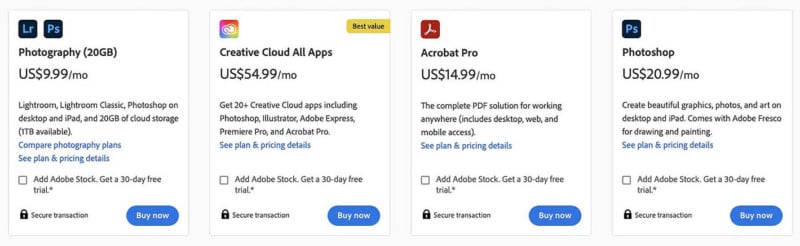
1. Subscription Fatigue Finally Hit a Breaking Point
Photoshop + Illustrator + Premiere Pro in 2026 can cost more than a full smartphone each year.
Many creators pay for features they never use.
When Affinity announced that their entire suite would become 100% free, it instantly removed the biggest barrier creatives have had for years: cost.
2. Adobe’s Performance, Bloat & Cloud-First Approach
Creators constantly complained about:
Slow startup times
Crashes during heavy projects
Forced cloud integration
Hidden background processes
Gigabyte-level installers
For many mid-range systems, Adobe began feeling like a burden — not a tool.
Affinity, meanwhile, is:
Lean
Fast
Offline-first
Optimized for modern hardware
Minimal bloat
3. AI Integration That Actually Helps — Not Confuses
Adobe’s Firefly tools are powerful, but many creators feel they are:
Too cloud-dependent
Slower than expected
Locked behind subscription tiers
Affinity took the opposite route:
Local AI enhancements
No subscription walls
Faster and lighter execution
This approach aligns perfectly with creators who want speed, privacy, and zero friction.
Why Affinity Studio Is Now the Best Free Alternative to Adobe
Affinity didn’t just become free — it became fully competitive.
Here’s how the tools stack up in 2026:
Affinity Photo vs Adobe Photoshop
Affinity Photo Advantages
Faster RAW processing
Real-time filters
Non-destructive editing
Better memory management
Local AI upscaling and cleanup
No cloud lock-in
Who benefits?
Photographers, editors, digital artists, meme creators, indie designers.
Affinity Designer vs Adobe Illustrator
Affinity Designer Advantages
Incredibly smooth vectors
Better pen tool handling
Lighter system load
CNC & laser-cut friendly exports
Faster zooms (literally 10,000,000% zoom without lag)
Who benefits?
Logo designers, UI designers, merch designers, brand creators.
Affinity Publisher vs Adobe InDesign
Affinity Publisher Advantages
Faster page rendering
Better master pages
Real-time preflight
Great cross-tool document syncing
Zero subscription requirements
Ideal for PDFs, magazines, books, client brochures
Who benefits?
Agencies, freelancers, social media content creators, print designers.
Why Creators Are Calling This “The First Real Adobe Competitor in Years”
For years, alternatives existed… but none truly replaced Adobe.
Until now.
Affinity Studio’s biggest advantage is cohesion:
All apps share the same UI thinking
Same keybind philosophy
Same rendering engine
Same file compatibility
Instant switching between apps (Photo ↔ Designer ↔ Publisher)
Adobe tools often feel separate. Affinity feels like one connected workspace.
This is exactly what modern creators want.
The Free Pricing Model Changes Everything
When Affinity announced its “Zero Cost Creative Suite” strategy, it shocked the industry.
This means:
Students get professional tools for free
Freelancers eliminate subscription overhead
Studios reduce operating costs
Beginners finally have a barrier-free entry point
Professionals can run Affinity alongside Adobe to transition smoothly
Adobe’s subscription model can’t compete with “free and powerful.”
Performance Benchmarks That Matter in 2026
Across community tests and creator reviews, Affinity consistently wins on:
Startup time
RAM usage
CPU spikes
Real-time rendering
Large canvas handling
Vector performance
Stability on long sessions
Creators say one thing repeatedly:
“Affinity feels like Adobe if Adobe was built in 2026—fast, clean, modern.”
Who Should Switch to Affinity Studio Today?
1. New Creators
You get a professional suite without paying a rupee/dollar.
2. Freelancers & Agency Designers
Cut costs and improve workflow speed immediately.
3. Students & Educators
No expensive subscriptions. No cracked software. No limits.
4. Adobe Users Who Want Freedom
You don’t need to leave Adobe entirely — Affinity works perfectly alongside your workflow.
Should You Completely Replace Adobe?
Short answer: It depends on your work.
Stay on Adobe if you:
Work in studios that require PSD/AI/INDD files
Rely heavily on niche Adobe-exclusive plugins
Use Premiere Pro / After Effects (Affinity has no video suite yet)
Switch fully to Affinity if you:
Want a fast, clean, modern workflow
Hate subscriptions
Work mostly with design, print, photography, logos, UI, or illustration
Value offline-first AI tools
Want a lightweight desktop experience
Most professionals in 2026 are choosing a hybrid approach:
Use Affinity for 80% of work
Keep Adobe for specific formats or video tools
Final Verdict: Is Affinity Studio the Future of Creative Tools?
Absolutely yes — especially now that it’s free.
Creatives are not leaving Adobe because Adobe is bad.
They’re leaving because Affinity finally became good enough to replace it.
And when a high-performance, modern, creator-friendly suite becomes free…
the industry doesn’t ignore it.
Affinity Studio is more than an “Adobe alternative.”
It’s the start of a new era where creativity isn’t locked behind subscriptions.
For creators, 2026 is the year of freedom.